![Avatar 8-1.png]](https://support.zapfloorhq.com/hs-fs/hubfs/Avatar%20%208-1.png?height=40&name=Avatar%20%208-1.png)
Line discount plus the applicable share of any invoice-level/global discount.
1. Purpose of the report
The Global Revenue report brings together all revenue reporting into a single, comprehensive view. It allows you to analyse your revenue from different perspectives, including by customer, product, product type, location, month, currency, invoice, and invoice line.
You can also choose whether the report is based on the Invoice Date or the Period Date. This lets you view the same revenue data from different accounting perspectives.
All charts, summary tiles, tables, and exports are generated from the same underlying dataset. As a result, the figures will always match, provided the same filters and date basis are applied.
When using Period Date, revenue may be allocated differently than when using Invoice Date. This is because revenue is recognised in the period in which it is earned, which can be earlier or later than the invoice date.
2. Filters
| Filter | Explanation |
| Date | Includes invoices and credit notes with a date inside the selected date range. By default this is the invoice date. When the period-date switch is on, the report uses the period date instead. |
| Location | Limits the report to the selected location or locations. Users only see locations they have access to. If only one location is available to the user, this filter may be hidden. |
| Customer | Limits the report to revenue linked to the selected customer. |
| Product type | Limits the report to invoice lines belonging to the selected product type. |
| Product | Limits the report to invoice lines for the selected product. |
3. Important calculation rules
- Revenue is shown excluding VAT. VAT is not included in the revenue totals.
- Discounts are deducted. Both line-level discounts and the applicable share of invoice-level/global discounts are taken into account.
- Credit notes reduce revenue. A credit note is counted in the invoice count but its value is subtracted from the revenue totals.
- Currency is not converted. When multiple currencies exist, select a currency to compare consistent values.
- Access rights apply. The dataset is limited to the locations the operator is allowed to access.
- 0-revenue lines are excluded. When an invoice line results in an amount of zero, it will not appear in the global revenue overviews.
Invoice date versus period date: The report can switch between invoice date and period date. The period date indicates when revenue is generated, which may precede or follow the invoice date if the invoice does not coincide with service or product delivery.
4. Top tiles, charts and tables
| Tile/Chart/Tabls | Explanation |
| Invoice count | The number of invoices and credit notes that match the selected filters. Count of all matching invoice documents, including credit notes. |
| Total revenue | The total net revenue for the selected filters. It's the sum of all matching invoice line totals excluding VAT, minus discounts. Credit note amounts are included as negative amounts. |
| Revenue per product type | This pie chart shows the share of total revenue represented by each product type for the full selected period. The value for each product type is calculated as the sum of all matching net invoice line totals for that product type, after discounts and credit notes. |
| Monthly total revenue | This bar chart shows the total net revenue per month based on the selected filters. The months shown on the X-axis depend on the selected date range and are based on the invoice date when the Period date switch is turned off, or on the period date when it is turned on. The Y-axis shows the total net revenue excluding VAT. It's the sum of all matching invoice line totals for that month, after discounts and credit notes. When reporting by period date, invoice lines are assigned to the month of their period date, which can distribute revenue differently from invoice-date reporting. |
| Monthly revenue by product type | This bar chart shows the total net revenue per month based on the products. It's the sum of all matching invoice line totals for that month per product, after discounts and credit notes. |
| Revenue by product type | Thisshows the share of total revenue represented by each product type for the full selected period. The value for each product type is calculated as the sum of all matching net invoice line totals for that product type, after discounts and credit notes. |
4.1 Invoice lines
The invoice lines table provides the most detailed level of the report. Each row represents one invoice line that matches the selected filters.
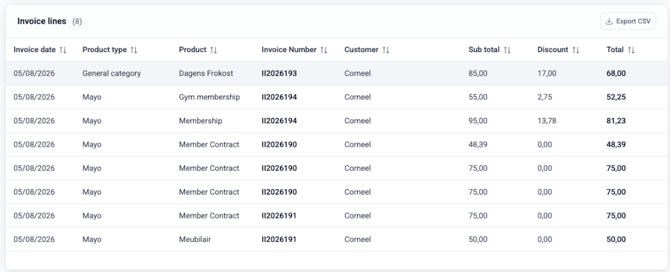
| Column | Meaning |
| Period date | The invoice line period date. This column is visible when the period-date switch is on. Taken from the invoice line reference date. If no reference date is available, it defaults to the invoice date. |
| Product type | Category of the product on the invoice line. Taken from the product configuration linked to the invoice line. |
| Product | Product on the invoice line. Taken from the invoice line. |
| Invoice number | Invoice or credit note number. |
| Customer | Customer linked to the invoice. |
| Subtotal | Gross line amount before discounts, excluding VAT. Quantity multiplied by unit price, before discount. |
| Discount | Discount amount applied to the line. Line discount plus the applicable share of any invoice-level/global discount. |
| Total | Net line amount used in revenue totals. Sub total minus discount. For credit notes, the amount reduces revenue. |
4.2 Invoices
The invoices table shows one row per invoice or credit note that matches the selected filters. When reporting by period date, an invoice can appear for a period even if its invoice date is outside that period, depending on the invoice lines that match the filters.
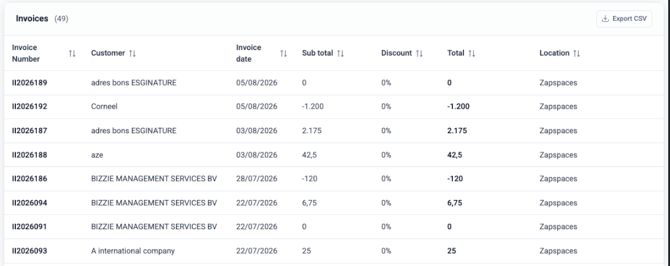
| Column | Meaning |
|---|---|
|
Invoice number |
The invoice or credit note number. |
|
Customer |
The customer linked to the invoice. |
|
Period date |
The invoice period date. This column appears when the period-date switch is on and hides when the switch is off. Based on the period dates of the invoice lines that match the selected filters. If no invoice line reference date is available, it defaults to the invoice date. |
|
Subtotal |
Gross line amount before discounts, excluding VAT. Quantity multiplied by unit price, before discount. |
|
Discount |
Discount amount applied to the line. Line discount plus the applicable share of any invoice-level/global discount. |
|
Total |
The invoice total excluding VAT after discounts for the lines included in the selected filters. Sum of the matching invoice line totals after discounts, excluding VAT. Credit notes reduce revenue. |
|
Location |
The location linked to the invoice. |
Note : The report data refreshes overnight. You can manually start this by clicking the ‘update reports’ button to ensure the report reflects current information.
5. Exports
The exports contain the same filtered data as the on-screen report. If the same filters and date basis are applied, the exported totals should match the corresponding tiles, charts, and tables. When reporting by period date, exported date columns and monthly groupings follow the period date instead of the invoice date where applicable.
| Export | Meaning |
|---|---|
|
Revenue per product type |
Aggregated revenue per product type, usually split by month. It's the sum of all product type totals should equal the Total revenue tile for the selected filters and currency. |
|
Invoice lines |
One row per invoice line. It's the sum of all product type totals should equal the Total revenue tile for the selected filters and currency. |
|
Invoices |
One row per invoice or credit note. The number of rows should match the Invoice count tile, and the sum of Total should match total revenue. |
CSV export note: When exporting to CSV, a pop-up lets you choose comma or semicolon as the separator. Depending on the Excel version and regional settings, choose comma ( , ) or semicolon ( ; ) to open the file with data already split into columns.